
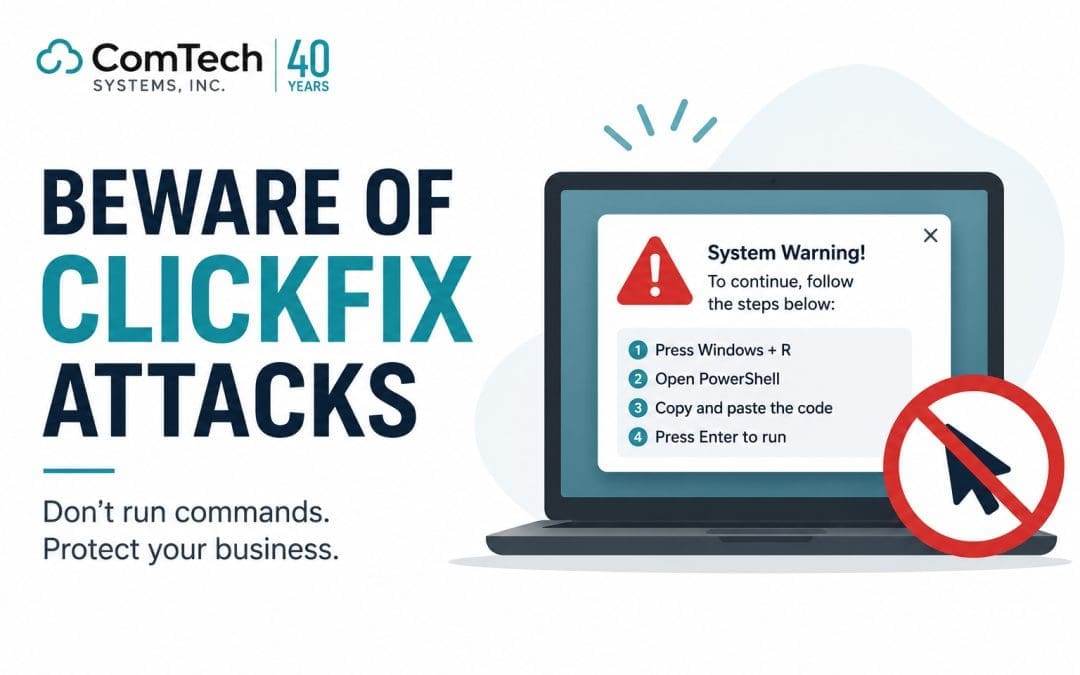
Quick answer: A ClickFix attack is a social engineering technique where cybercriminals display fake error messages or pop-ups that trick employees into manually running malicious commands on their own computers, bypassing most traditional security defenses. No special hacking skills required on the attacker's part. Just a convincing fake prompt and a distracted employee.
Table of Contents:
Let's be honest: most people picture a cyberattack as something dramatic. A hooded figure typing furiously in a dark room, exploiting obscure code vulnerabilities, cracking firewalls in real time. The reality in 2025 looks a lot less cinematic, and in many ways, a lot more dangerous.
Today's attackers have largely stopped trying to break through your digital walls. Instead, they knock on the front door and wait for someone to let them in. That is exactly what ClickFix attacks are designed to do. They target your employees, not your software, and they are working at an alarming rate.
Whether you run a five-person accounting firm or a 200-seat distribution company, your team is a target. And the scary part is that the employees who fall for ClickFix attacks are not careless or uninformed; they are simply doing what the prompt tells them to do, just like they would with any legitimate IT instruction.
This guide will walk you through exactly what a ClickFix attack is, how it works step by step, the warning signs every employee should know, and what your business can do right now to reduce your exposure. If you are also looking at your broader security posture, our The Cybersecurity Services page covers how we approach layered protection for businesses of all sizes.
What Is a ClickFix Attack?
A ClickFix attack is a specific type of social engineering cyberattack. The term "social engineering" simply means the attacker is manipulating a human being rather than exploiting a software flaw. No zero-day vulnerability. No brute-force password cracking. Just a well-crafted fake message and a set of instructions that look completely reasonable at first glance.
Here is how the deception is framed: you are browsing the web, checking email, or trying to open a shared document, and suddenly a message appears. It might look like a Microsoft 365 error, a Teams notification, a browser security warning, or even a CAPTCHA page. The message tells you something has gone wrong: your account needs verification, a file failed to load, your browser is outdated, or security software needs to be reset.
Then it gives you the fix. Simple instructions. Usually something like: press a keyboard shortcut, open a built-in Windows tool, paste a command, and hit Enter. The whole process takes about thirty seconds. And in those thirty seconds, an attacker can gain full access to your machine.
The name "ClickFix" comes from this exact framing: click here, follow these steps, and fix the problem. It is a social engineering con dressed up as IT support.
What makes it particularly dangerous is that traditional security tools are often blind to it. Antivirus software and email filters look for known malware signatures and suspicious files. When a legitimate user types a command themselves, that behavior rarely trips an alarm. To the security system, it looks like normal activity because technically, it is.
How Does a ClickFix Attack Work?
Understanding the mechanics of a ClickFix attack makes it much easier to spot one in the wild. The attack typically unfolds in three phases, and each phase is designed to feel completely normal until it is too late.
Phase one—the convincing fake prompt
The first thing an attacker needs is to get your attention and establish trust. They do this by creating fake messages that closely mimic software and platforms your employees already use and trust on a daily basis. Common disguises include:
- Microsoft Teams error messages saying your account session has expired and needs reactivation
- Microsoft 365 or Outlook pop-ups claiming your mailbox has a security issue requiring manual resolution
- Browser warnings from what appears to be Chrome, Edge, or Firefox telling you a certificate has expired or a plugin needs updating
- Fake CAPTCHA or "Verify you are human" pages that appear before you can access a shared document or file
- SharePoint or OneDrive prompts saying a file cannot be previewed without running a quick verification step
- Generic IT helpdesk-style pop-ups claiming your device needs a configuration fix
These messages are professionally designed. They use the right logos, the right color schemes, and, importantly, the right tone. They do not scream "scam." They look exactly like the kind of IT notice you might expect to see on a Tuesday morning.
Phase two—the instructions
Once the fake message has your attention, it walks you through a short set of steps to "resolve" the issue. This is the core of the ClickFix technique. The instructions typically ask users to:
- Press Windows + R to open the Windows Run dialog box
- Open PowerShell or Command Prompt from the Start menu
- Copy a string of text from the page and paste it into the terminal window
- Press Enter or click a "Run" button to execute the command
The command itself looks like a meaningless jumble of characters to most people. It could be a long URL, a base64-encoded string, or a PowerShell script that runs in a single line. None of it looks dangerous because most employees have never needed to read or interpret a command-line instruction before.
What they do not know is that the command is silently reaching out to a server controlled by the attacker and downloading whatever the attacker wants to install on that machine.
Phase three—what happens on the back end
The moment the command executes, the attacker's payload is delivered. Depending on what the attacker is after, the consequences can range from a data theft incident to a full-blown business disruption:
Outcome 1
Malware or ransomware is silently installed and begins running in the background immediately.
Outcome 2
The attacker establishes remote access, giving them the ability to watch, control, or copy everything on the device.
Outcome 3
Saved passwords, browser credentials, and authentication tokens are harvested and sent back to the attacker.
Outcome 4
The compromised machine becomes a foothold inside your network, allowing the attack to spread to other systems and users.
In many cases the employee has no idea anything has happened. The fake error message disappears, the page refreshes, and everything seems normal. Meanwhile, the attacker has everything they need to start doing real damage.
Warning Signs of a ClickFix Attack
One of the most valuable things you can do for your business is make sure every employee can recognize the red flags before they act. Here is what to watch for:
- Any pop-up or webpage asking you to open PowerShell, Command Prompt, Terminal, or the Windows Run dialog
- A CAPTCHA or identity verification page that instructs you to copy and paste a command rather than click a checkbox or enter text normally
- Messages claiming Microsoft 365, Outlook, Teams, OneDrive, or your browser requires a "manual repair" or "quick fix" that involves running code
- Websites that require you to execute a script or command before you can view a document, image, or video
- Urgent language designed to pressure immediate action phrases like "your account will be suspended," "act now to prevent data loss," or "this must be completed within 5 minutes."
- Instructions to press Windows + R or any keyboard shortcut that opens a system tool
- Any prompt that arrives unexpectedly, even if it appears to come from a trusted platform, asking you to run unfamiliar code
Legitimate software companies, including Microsoft, never ask users to manually run a command in order to verify their identity, access a file, or fix a software error. That is not how real IT support works.
This single fact is worth repeating in every security training session your team ever attends. Real IT tools do not ask you to open a terminal and type things in. Real Microsoft prompts do not require keyboard shortcuts to "activate" a verification. If you are ever looking at a screen that does ask for this, it is almost certainly a ClickFix attack.
What Should You Do If You Encounter a ClickFix Prompt?
Knowing what to do in the moment matters just as much as being able to recognize the attack. Here is the protocol every employee should follow:
- Stop immediately. Do not copy anything. Do not paste anything. Do not press Enter or click Run. Just stop.
- Take a screenshot of the suspicious prompt or webpage before you close it. This helps your IT team investigate the source.
- Do not close the browser tab or window yet. Your IT team may want to review the URL and page content.
- Call or message your IT support team right away and describe what you saw. Do not proceed on your own.
- Do not forward the link or email to colleagues to "show" them; you could inadvertently spread the attack.
- If you already ran the command, disconnect your device from Wi-Fi or unplug the network cable immediately and notify IT. Fast action can dramatically limit the damage.
- Report it regardless of whether you took action. Even if you did not fall for it, reporting helps your IT team track attack patterns and protect others.
Best Practices to Protect Your Business from ClickFix Attacks
Technical defenses alone will not stop a ClickFix attack. Because the attacker relies on a human being to do the work, the most effective protections combine people, processes, and technology together. Here is what that looks like in practice.
Security awareness training
This is the single most important investment a business can make against social engineering attacks. Employees who have seen what a ClickFix prompt looks like even in a simulated training environment are far more likely to pause and question a real one. Training should not be a one-time annual event. It should be ongoing, updated as new attack techniques emerge and are reinforced with regular reminders and simulated phishing tests.
The goal is not to make employees paranoid. It is to make them habitually skeptical of unexpected prompts, especially ones that ask them to do something unusual, even if the request looks official.
Email and web security filtering
A phishing email with a malicious link is often the beginning of many ClickFix attacks. A user-friendly email security solution checks incoming emails for spoofed domains. suspicious senders and malicious URLs before they land in the user's inbox. Web filtering contributes by blocking access to websites that are known to house fraudulent prompts and malicious scripts.
Both email security and web filtering solutions can function independently, but when used in concert, they lessen the number of ClickFix attacks that would otherwise be successful.
Endpoint detection and response (EDR)
Modern endpoint security has more features than traditional antivirus. They track the behavior of devices in real time and can identify things like suspicious connections, unexpected processes, and anomalous file behavior. If a user executes a command on their own device, an EDR tool can still identify the behavior that is executed and report this to your security team.
Multi-factor authentication (MFA)
If a ClickFix attack is successful and an employee’s login credentials are gained, the only thing that stands between the attacker and your business is MFA. With MFA, an attacker still cannot access email and other systems, because they would need more than just the stolen employee credentials. This control limits the impact of successful credential theft.
Limit privilege access
Not all employees should be given higher access levels for their work devices or access to company systems. The restricted access is one of the best defenses against ClickFix. If this type of attack is executed against an employee's work device, limited permission will prevent them from accessing or controlling most systems and devices. This type of access is generally made available as part of a routine check. These types of checks are important and should be done regularly.
Consistent OS and Software Updates
Some of the ClickFix payloads use OS, browser, or application exploits to gain higher access. ClickFix payloads are of lesser utility the more the software is updated, as they become limited with methods to escalate their access from device to device.
Defined incident reporting process
Define for all employees where they should be reporting what they suspect is an incident. This may be a phone number for a help desk, an internal ticket system, or a DM to the security team. If it is easier for employees to report their incidents, the security team's incident reporting will be timely.
IT Security Monitoring
Small and medium-sized businesses may lack the ability or specialist employees to support a security operations staff team. Security operations may be provided as a service by a managed IT service provider. This provides an operational security staff team during contracted hours at the cost of building the staff in-house. Unlike the in-house team, the managed service team will provide security operations during off hours. Security Operations aims to increase the likelihood of catching security incidents before a breach occurs.
Final Thoughts
ClickFix attacks have grown in popularity among hackers as a tool, not because they can outsmart cybersecurity defenders with complex techniques, but because these attackers have developed a clever and tacit, cynical attack. ClickFix attacks leverage the trust of employees towards the common, everyday workplace tools and malignantly harness the human response of following 'tips' or instructions when and if something appears to go wrong.
Propitiously, most ClickFix attack techniques are based on the victim's ignorance of the attack tool's working. For once, in contrast with zero-day exploits, the awareness of the would-be victim serves as a first line of defense against these attacks. Inform your employees first of these tools' workings, and you effectively eliminate the majority of possible ClickFix attack vectors on your organization.
"Legitimate software vendors and Microsoft do not require users to manually run commands to verify their identity, fix an error, or access a document. If a prompt ever asks you to do this, stop, screenshot it, and call your IT team."
Internalize the following statement and pervasively disseminate it:
Legitimate software vendors and Microsoft do not require users to manually run commands to verify their identity, fix an error, or access a document. If a prompt ever asks you to do this, stop, screenshot it, and call your IT team.
Combined with an array of pragmatic information technology controls, you can be assured of an adaptive security posture to ClickFix attacks and similar cyber threats.
Most of all, ClickFix attacks serve as a reminder to your team on what not to click.